

The assistant turns a spoken note into a sell order. You press the microphone, say who is buying and what they are taking, and it writes the order for you to check and finish. It is for the times when typing is the slow part: a warehouse floor, a phone in one hand, a counter with a queue.
The assistant is a module, but it is not in your team's add-ons and you cannot turn it on yourself: the people who run Control Total turn it on for your team on request. Ask for it from Support → Tickets, at the bottom of the menu. Until then, the Assistant entry is not in the menu.
Before it works
The assistant needs an OpenAI key, filled in at Settings → General Configuration as OpenAI API Key. It starts with sk- and it is yours, not something the system provides. Without it the microphone answers with OpenAI API key not configured and nothing is recorded.
The browser also asks for the microphone the first time. Refusing it leaves the assistant with nothing to listen to, and the screen says so.
Dictating an order
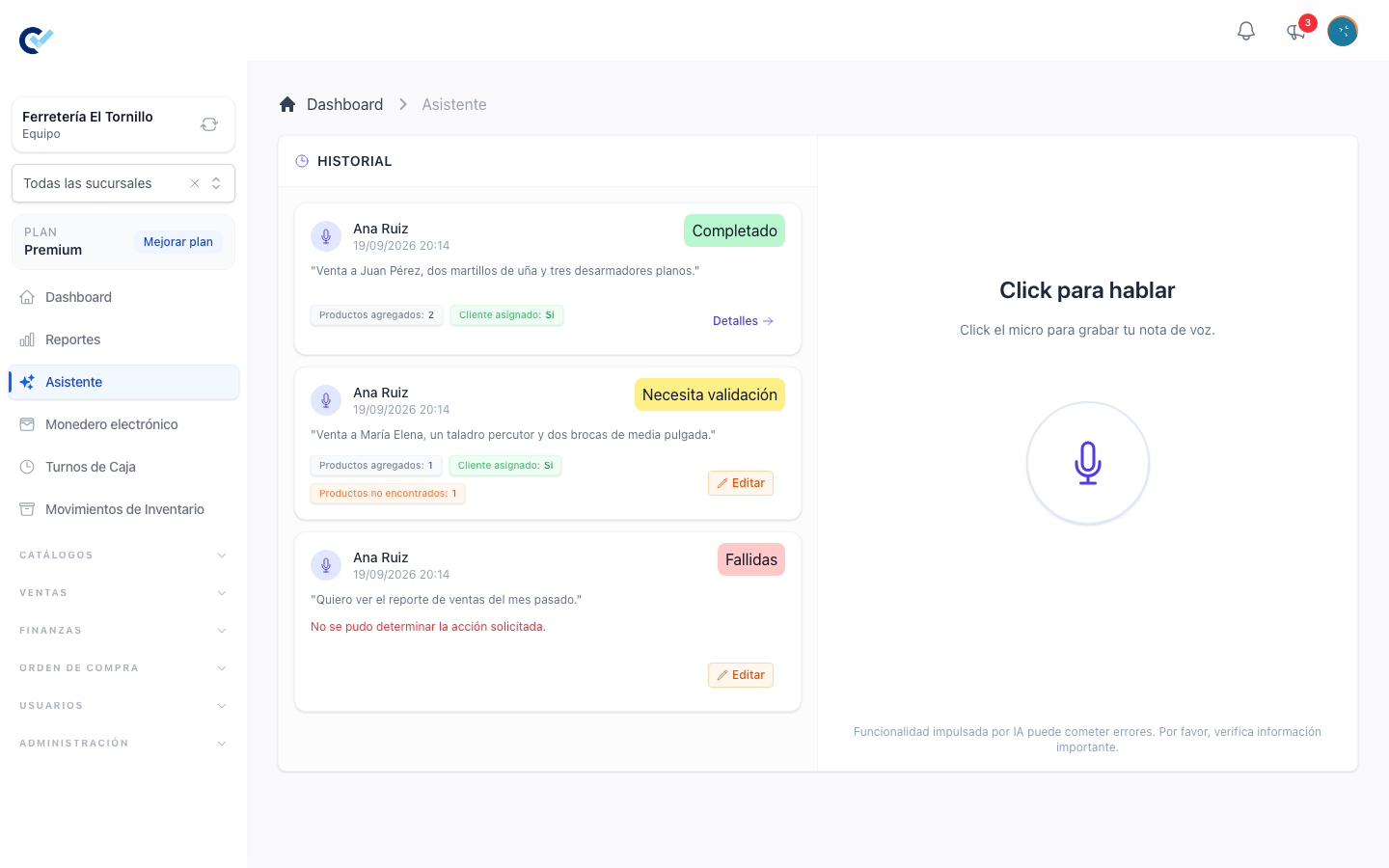
Assistant in the menu opens one screen: a microphone in the middle, and the history of everything dictated before it down the side.
Press the microphone and speak. Say who the customer is and what they are taking, the way you would say it to a colleague — venta a Juan García, tres piezas del producto A y una del producto B. Press it again to stop, and it goes away to work: Listening… while it records, Processing… while it thinks.
What happens next is not instant, and it does not keep you waiting either. The order is written in the background, and you stay on the assistant screen — free to dictate the next one. The finished order is reached from the history, not from a window that opens on its own.
Once your team has used every document its plan allows this month, the assistant refuses the order and says so, as any other screen would. See Your plan and support.
The history
Every attempt is listed, newest first, ten at a time and more as you scroll. Each one carries what it turned into:
| Status | What it means |
|---|---|
| Pending | Taken, not started yet. |
| Processing | Being transcribed and read. |
| Needs Validation | It came out, but something is missing: it could not place the client, it added no products, or it heard products your catalogue does not have. |
| Completed | The sell order is written, with the client and every product you mentioned. |
| Failed | Something went wrong — usually the audio or the key. |
| Cancelled | Stopped before it finished. |
A completed one summarises what it found: whether it matched the client, which products it added, which ones you mentioned that it could not find in your catalogue, and what the order came out as.
A dictated order is not saved for you: it waits for you to check it, and until then it is not in Sell Orders and does not count against your plan. While it waits, its row offers Edit, which opens the sell order in its editor; save it as a draft or finish it there. Once it is saved the row offers Details instead, which opens the order's page. An order nobody saves is removed after seven days.
The recording is kept with the attempt and the history plays it back, which is how you settle whether it misheard you or you misspoke.
What it gets wrong, and what you do about it
The order it writes is a draft. It is not finished, it has not moved stock and it has not taken any money — all of that still happens when you finish it yourself, exactly as in create a sell order. Check it before you do.
Three things are worth checking every time:
- The client. It matches against your client list by what it heard. A name it could not place leaves the order without one.
- The products it did not find. These are named in the summary rather than guessed at. A product missing from the order is usually a product your catalogue calls something else.
- The quantities. Numbers are the easiest thing to mishear, and the most expensive.
The only thing it knows how to do is a sell order. Anything else you dictate comes back saying it could not work out what you were asking for, and nothing is created.
The screen says as much under the microphone: what the assistant produces can be wrong, and important information is worth verifying.
Permissions
The assistant has no permission of its own: whoever reaches the menu entry may dictate. What it produces is an ordinary draft sell order, so finishing it, pricing it and collecting for it follow the permissions those steps already follow — see create a sell order. The key in the settings is reachable only by someone who may edit them.