

Cancel or replace a CFDI
How a stamped CFDI is cancelled, which SAT reason applies, when a replacement invoice is required, and what each answer from the authority leaves the document in.
A stamped CFDI is never deleted. Once the SAT has stamped it, the only way back is a cancellation request, and the SAT decides whether it is accepted. This guide covers what Control Total does when you ask for a cancellation, the reason you have to declare, the case that demands a replacement invoice, and how to read the state the document ends up in. Issuing the CFDI in the first place is covered in Issue a CFDI invoice.
Your team may have renamed these entities for itself from the settings, so the screen can say something other than "sell order" or "fiscal invoice". The behaviour is the same.
What a fiscal cancellation touches
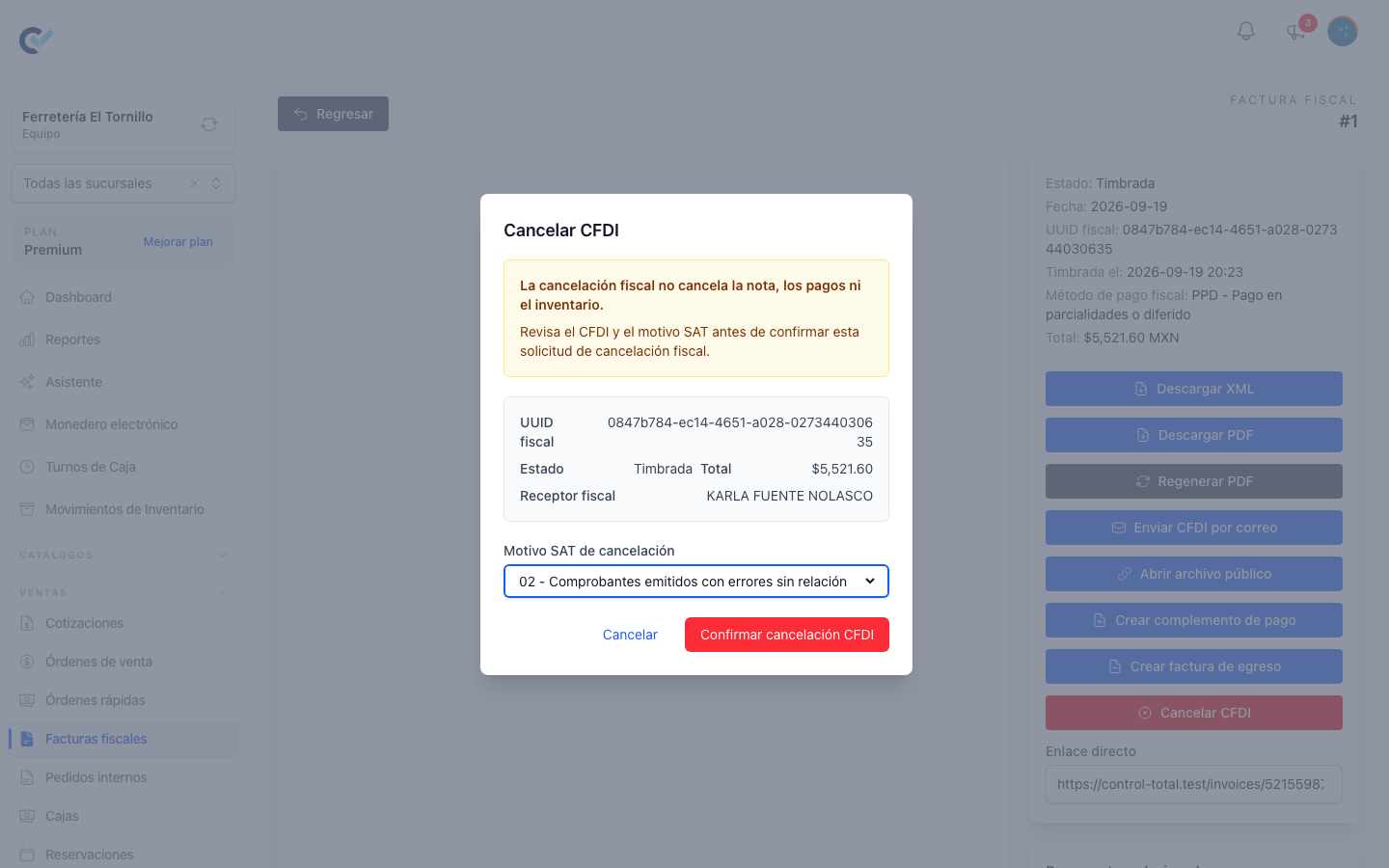
Cancelling the CFDI is a fiscal act and nothing more. The cancellation window says so before you confirm: the sell order behind the invoice, the payments registered against it and the inventory it moved are all left exactly as they were. If the commercial side of the sale also has to be undone, that is separate work on the sell order.
The cancelled CFDI keeps its XML, its PDF and its acknowledgment, and it can still be sent by email or opened through its public link. Nothing is erased.
Before the option appears
Cancel CFDI is offered on the invoice's page only when all of the following hold:
- The document is Stamped. A draft is discarded instead of cancelled, and a document already cancelled or already awaiting an answer has no button.
- It carries a fiscal UUID.
- The fiscal module is active for the team.
- You hold the permission listed at the end of this guide.
Two more conditions are checked when you confirm, and they stop the request with a message rather than silently:
- The SAT cancellation reason catalogue has to be loaded and the reason you chose has to be an active code in it.
- The invoice must have no payment complement that is still live or still being processed. Those are cancelled first — see Credit notes and payment complements.
The SAT cancellation reasons
SAT cancellation reason offers the authority's own catalogue:
| Code | What the SAT calls it |
|---|---|
01 |
Comprobantes emitidos con errores con relación |
02 |
Comprobantes emitidos con errores sin relación |
03 |
No se llevó a cabo la operación |
04 |
Operación nominativa relacionada en una factura global |
The window opens on 02 when that code is available, because it is the reason that needs nothing else attached. Reason 04 is the one that belongs to a sale already included in an invoice to the general public — see Invoices to the general public.
Choosing the reason is a fiscal decision, not a formality. Control Total sends the code you pick to the SAT exactly as chosen and does not interpret it for you.
Why reason 01 demands a replacement
Reason 01 declares that the CFDI was issued with errors and that another CFDI already replaces it. The SAT therefore wants the replacement's UUID in the same request, so the window asks for Replacement fiscal invoice and refuses to continue without one.
An invoice qualifies as a replacement when every one of these is true:
- It belongs to the same team, and it is of the same kind as the one being cancelled — an income invoice replaces an income invoice, a global one a global one.
- It is Stamped and has its own fiscal UUID.
- It is not the invoice being cancelled.
- It has not already been used as the replacement in another reason
01cancellation. - It is either issued to the same client, or it already declares that it substitutes this one.
One more check runs at the moment of confirming: if the invoice you picked declares related CFDIs of its own, one of them has to be the substitution of this invoice. An invoice that declares no relations at all is still accepted.
When a stamped invoice already declares that it substitutes this one, the window opens with reason 01 and that invoice already selected, so the common case needs no choosing.
Cancel and replace, in one flow
When the replacement does not exist yet, Cancel and replace builds it for you. The button sits on the stamped invoice's page, under Cancel CFDI, and is offered for income invoices — not for a global invoice and not for an egreso invoice.
- Press Cancel and replace. A confirmation says that a new invoice will replace this CFDI after it is stamped. Press Continue.
- Control Total creates a copy of the invoice: the same client, the same receiver and issuer data, the same concepts, the same fiscal payment method and SAT payment form, the same series. The copy is dated today and carries no folio yet, and it already declares that it substitutes the original.
- The copy opens in the invoice editor. Correct whatever was wrong and press Stamp CFDI.
- The moment the replacement is stamped, Control Total asks the SAT to cancel the original with reason
01, pointing at the UUID the replacement just received.
Until step 4 the original stays live: it is a stamped CFDI with a stamped CFDI beside it. If you abandon the replacement before stamping it, the original is untouched and you are left with a draft to finish or discard.
Asking for the cancellation
Cancel CFDI opens a window that restates what is at stake before the reason: the fiscal UUID, the current status, the total, the fiscal receiver, and the number of live payment complements when there are any. Choose the SAT cancellation reason, pick a Replacement fiscal invoice if the reason is 01, and press Confirm CFDI cancellation.
If anything blocks the request, the window says which condition failed and the request is never sent. Otherwise the request goes to the fiscal provider and on to the SAT, and the answer comes back in the same step.
What the answer means
Control Total records who asked, when, with which reason and against which replacement, and then writes down whatever the SAT answered.
| What came back | What the document becomes |
|---|---|
| The SAT cancelled it | The invoice is Cancelled, with the date it was applied. |
| The SAT has it in process | The invoice sits at Cancellation in progress. |
| The SAT rejected it | The invoice returns to Stamped and the rejection message is shown. |
| The provider could not be reached, or answered an error | The invoice returns to Stamped and the error is shown. |
A rejection or an error leaves the document exactly as it was, so the request can be corrected and made again — a common rejection is a UUID that does not belong to this issuer, or a CFDI the SAT does not consider cancellable.
Cancellation in progress is different. The request was accepted but not resolved, and from that state the invoice can no longer be cancelled again, because it is no longer stamped. Control Total does not ask the SAT a second time on its own, so the outcome of a cancellation left in process is confirmed with the SAT or with your fiscal provider, not from this screen.
After a cancellation is applied
A CFDI the SAT actually cancelled shows a CFDI cancellation panel on its page, with the SAT reason and its description, who requested it, when it was requested, when it was applied, and the replacement UUID — as a link to the replacing invoice when that invoice lives in Control Total, and as plain text when only the UUID is known.
Cancelling a payment complement
A stamped payment complement is cancelled the same way, from its own page. The one difference is the reason list: reason 01 is not offered, because a payment complement is not replaced by a substitute invoice. When the SAT confirms the cancellation, the invoice it was paying has its payment status recalculated, so the balance the complement had covered comes back.
Who can do it
In Users → Roles, each row of the permissions grid is something the system holds and each column an action, written here as Row: Column. Cancelling answers to the Delete column, because a finished document is never deleted — it is cancelled. A role needs:
| Action | On the Roles screen |
|---|---|
| Cancel a stamped income or global invoice | Fiscal Invoice: Delete |
| Cancel a stamped egreso invoice | Egreso invoice: Delete |
| Cancel a stamped payment complement | Payment complement: Delete |
| Start Cancel and replace | Fiscal Invoice: Create |
| Stamp the replacement | Fiscal Invoice: Create |
Whoever can cancel must also be able to reach the document in the first place, and "Only sees their own data" still applies: a person restricted that way can act only on the documents they created. A global invoice is the exception — it groups the whole team's sales, so it has no single owner and stays outside that restriction.