

Every movement of your stock
Why the stock of a product is the sum of its movements rather than a number somebody typed, what writes a movement, and how to read the list when a figure is not what you expected.
The stock of a product is not a number stored somewhere and edited. It is the sum of every movement that product has ever had: a purchase adds, a sale subtracts, a return adds back, a transfer subtracts from one branch and adds to another. The figure on the product screen is that sum, worked out as you look at it.
That is why this list matters. When a count does not match the system, the answer is never the number is wrong — it is always one of the movements, and they are all here, each one naming the document that wrote it and the person who was signed in.
The list is Inventory Movements in the menu, and it comes with the inventory module, the same one that keeps stock. Physical inventory is not needed to see it.
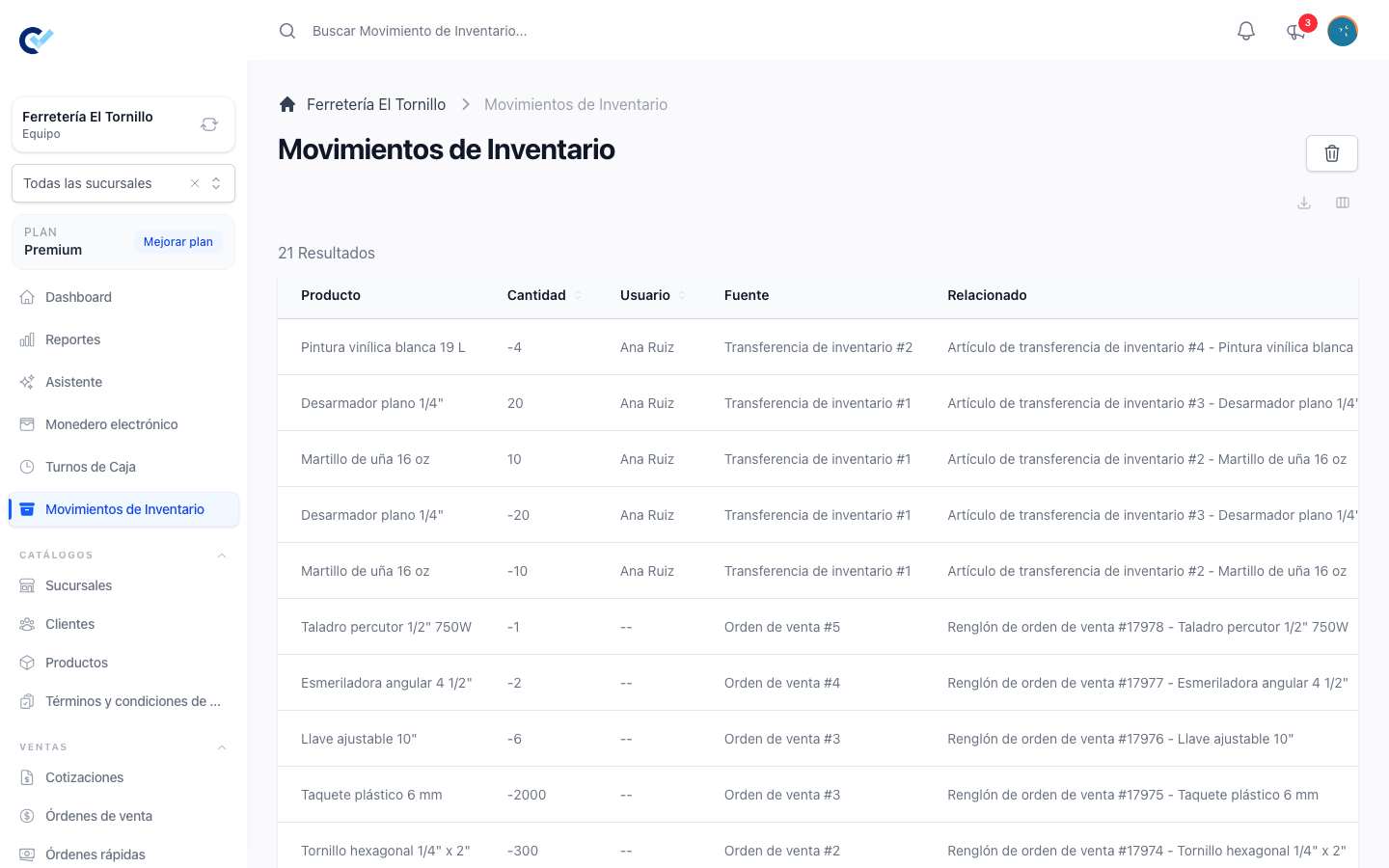
What a movement holds
| Column | What it says |
|---|---|
| Product | The product, or the variant, the movement belongs to. |
| Quantity | Positive to add, negative to subtract. Three decimals for a product sold in fractions. |
| User | Whoever was signed in when it was written. |
| Source | The document behind it, as a link — a purchase order, a sell order, a sell order adjustment, an inventory transfer or a physical inventory. Ajuste manual when no document wrote it, and Documento eliminado when the document was deleted afterwards; neither has a link. |
| Related | The line of that document it came from, with the name of the item. |
Movements are also filed to a branch when your team uses branches, which is what makes each branch's stock its own. See work with branches.
Searching the list
The search box above the list finds a movement by what you can see in it. Every word you type has to match one of these:
- The product — its name, SKU, product code or number. A variant is found by its own name, its options, its number or its SKU, and also by its product: searching a product brings up the movements of all its variants with it.
- The movement's own number.
- The user who was signed in when it was written, by name.
- The source — the folio or number of the document, or its type as the Source column names it, such as purchase order or inventory transfer. Ajuste manual finds the movements no document wrote.
- The related line — its number, or the name of the item on it.
Quantity is not searched. Numbers match in part, so 12 also finds 112 and 1203.
A product or variant that was deleted is not found by searching for it, and neither are the variants of a deleted product. Their movements are still there: clear the search and they are in the list as always.
What writes one
Nothing is written by hand. Every movement has a document behind it:
- Finishing a purchase order adds what arrived, at the cost it was bought for. See purchase orders and cost.
- Finishing a sell order subtracts what was sold. A draft does not: stock moves when the sale is finished, not when it is captured. See create a sell order.
- A return adds back what the customer handed over. A post-sale discount does not touch stock — no goods came back. See returns and post-sale discounts.
- Cancelling a finished document undoes what it had done.
- Sending a transfer subtracts from the origin branch, and receiving it adds to the destination; cancelling one adds it back to the origin. See move stock between branches.
- Typing a figure into Current quantity on the product screen writes the difference as a movement of its own. It is the one place where stock is set by hand, and even there the history is added to rather than replaced — which is how you correct a count without losing what it used to say.
Only products that use inventory get movements at all. A service has nothing to count, so it has no stock and no movements — the two product types are explained in products and stock.
Reading it when a figure is wrong
Work from the product, not from the list. Open it, look at the figure the system holds, and then search this list for it — its name, SKU or code is enough — and read its movements from the newest down, adding as you go. The row where the running total stops matching the count is the event to go and look at, and Source opens the document that wrote it.
The usual answers, in the order they are usually true: a sale that was never finished, a purchase that arrived and was never registered, a transfer that was sent and never received, or stock counted in one branch while the screen was standing in another.
The inventory report
For the same question asked over a period rather than over a product, there is the Inventory report: balances and movements grouped by product between two dates, exportable to Excel. See reports.
Permissions
The list follows the See Inventory Movement permission, and the Inventario module has to be on, from your team's add-ons. Nothing is created, edited or deleted from this screen by anyone: a movement is written by the document that caused it, and it stays.